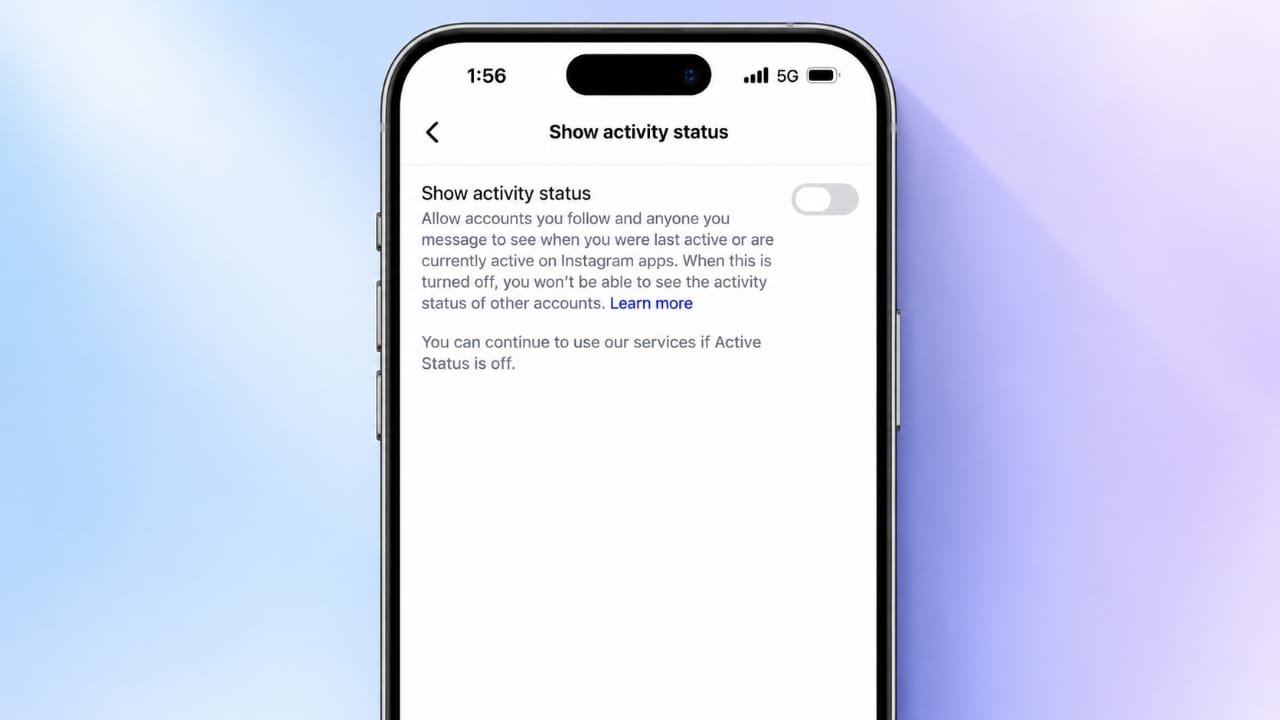
Instagram allows users to see when other people are online or were recently active. While this feature can make chatting easier, some people prefer to keep their online activity private. If you want to browse Instagram without showing others when you are online, you can turn off your Active Status in the settings.
The process is simple and works on both Android and iPhone. You can also change this setting through Instagram’s website.
Also read: How to Turn Off the Passcode on an iPhone
What Is Active Status on Instagram?
Active Status is a feature that gives other users an idea of when you are using Instagram. Depending on the account and available features, they may see a green dot next to your profile picture or a message such as “Active now” or “Active 10 minutes ago.”
This information is mainly displayed in Instagram’s messaging area. It can help friends understand whether you might be available for a conversation.
However, not everyone wants to share this information. You might want to check your messages, watch Reels, or browse posts without feeling that you need to reply immediately.
Turning off Active Status gives you more control over your online visibility.
Who Can See Your Active Status?
Instagram does not display your activity status to every person on the platform. Visibility generally depends on your interactions and connections, including people you follow and people you have exchanged messages with.
When Active Status is enabled, eligible users may be able to see whether you are online or when you were last active.
If you prefer not to share this information, Instagram provides a setting to disable it. Keep in mind that the exact wording and location of the option may change as the app receives updates.
There is also an important limitation: Instagram’s standard Active Status setting does not let you hide your activity from only one selected person while showing it to everyone else. Turning it off disables this visibility more broadly.
How to Turn Off Active Status on Instagram
You can disable the feature in a few steps. The menu names may vary slightly depending on your app version.
Steps for Android and iPhone
Follow these instructions in the Instagram mobile app:
- Open Instagram and sign in to your account.
- Tap your profile picture in the bottom-right corner.
- Tap the three-line menu in the top-right corner.
- Open Settings and privacy.
- Look for Messages and story replies or the relevant messaging settings.
- Select Show Activity Status.
- Turn off the option to display your activity status.
Once the setting is disabled, Instagram should stop showing your online status and last-active information to other eligible users.
If the menu looks different on your phone, use the search option in Settings, if available, to look for “Activity Status.”
Steps to Turn Off Active Status on a Computer
You can also check this setting through Instagram’s website.
- Open Instagram in your web browser.
- Log in to your account.
- Open the menu, usually found in the lower-left corner.
- Select Settings or the relevant privacy and messaging options.
- Find the activity status setting.
- Disable the option that allows others to see when you are active.
Instagram may change its desktop layout, so the exact menu path can differ. If you cannot find the option, check the current settings available for your account or try the mobile app.
What Happens When You Turn Off Active Status?
Disabling Active Status changes how your online activity appears to other users. Here are the main things to know.
1. Your Online Status Is Hidden
Other eligible users will no longer see your green activity indicator or your last-active information through this feature.
This can be useful when you want to use Instagram without making your availability visible.
2. You Cannot See Other People’s Activity Status
Instagram generally applies this setting both ways. When you turn off your own Active Status, you also lose the ability to see other users’ activity status through the same feature.
You can still send and receive direct messages as usual.
3. You Can Reply to Messages at Your Own Pace
Turning off Active Status does not prevent people from messaging you. It simply removes one way they might check whether you are online.
You can read messages and respond when it suits you. However, this setting does not stop notifications or hide all signs of your interactions.
4. Your Likes, Comments, and Story Views Remain Visible
Active Status only controls the visibility of your online activity through that feature. It does not make your Instagram account completely invisible.
Other users may still see your likes, comments, or story views where those interactions are normally visible. Your messages and other activities are also governed by their own privacy settings.
If you want to limit who can view your posts, consider reviewing your account privacy settings separately.
Does Turning Off Active Status Hide Your Instagram Account?
No. Disabling Active Status does not hide your entire account or make all your activity private.
Your profile, posts, and interactions may remain visible according to your account settings. If your account is public, people may still be able to view your public content.
For additional privacy, you can consider switching to a private account, reviewing your followers, or using Instagram’s Restrict and Block features when appropriate.
Each option serves a different purpose, so choose the one that matches your privacy needs.
Can You Turn Active Status Back On?
Yes. You can return to the same settings and enable the feature whenever you want.
After turning it back on, your activity status may become visible to eligible users again. You do not need to keep the setting disabled permanently.
This flexibility allows you to choose how much online visibility you want at different times.
Also read: How to Set Up and Use Face ID on an iPhone
Final Thoughts
Turning off Active Status on Instagram is a straightforward way to limit the visibility of your online activity. It can help you browse content and manage conversations without showing others when you are available.
The setting does not stop messages, hide your likes, or make your entire account private. Instead, it focuses specifically on online and last-active information.
If you value privacy, review this option alongside your other Instagram settings. A few small adjustments can help you create a more comfortable experience while using the platform.

Advertisements